
Illustration creation
ClariNet provides two methods for extracting data from an illustration document using AI: Direct Extraction and Table Extraction.
Note: You need access to Document Miner to use these features. See how to set up Document Miner access.
Document Miner uses AI to extract data from your PDF. While it aims for high accuracy, document quality and formatting variations can affect the results. Always manually verify extracted values, especially when working with poor-quality scans or complex PDFs.
If Document Miner struggles to process a specific PDF, please let us know along with details on what needs improvement. Your document will remain confidential and will be used solely by our team to refine our extraction models.
Direct extraction
Direct Extraction processes the entire PDF to identify, interpret, and collate policy parameters and cash flow schedules into a complete ClariNet illustration automatically.
It extracts:
- High-level fields: Face amount, maturity age, etc.
- Charge structures: Percent-of-premium charges and per-policy charges.
- Flow tables: Premium and net death benefit flows.
How to use Direct extraction:
You can invoke the creation wizard from either the Documents page or directly from the Illustrations page:
- From the Illustrations Page: Click the Lightning icon at the top of the illustrations page, then select an existing document or upload a new one.

- From the Documents Page:
- Add the document: Upload an illustration PDF to the Documents page and set its document type to Illustration (indicative).
- Launch the wizard: Save the document to the case, then click the Action button next to the file and select Create Illustration. Verify the document is selected in the wizard, then click Create Illustration.
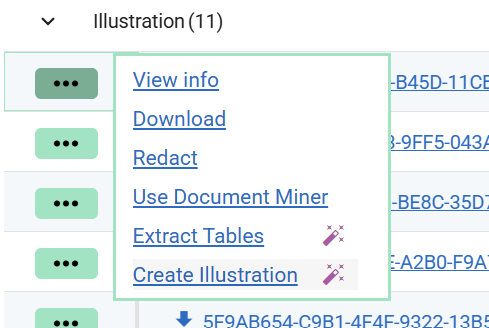
Once the wizard is triggered via either method:
- Wait for processing: Processing takes approximately 45 seconds. Once finished, the illustration is automatically generated in ClariNet. Review any warnings regarding missing fields or low confidence, then close the dialog. The new file will appear on the Illustrations page.
- Inspect field justifications: Illustrations generated via AI feature a Wand icon next to their listing. Click this icon to view confidence ratings, data quality warnings, and source justifications for extracted values.
Table extraction
Table Extraction isolates raw table structures from the PDF without mapping them to high-level policy fields, giving you direct control over table data entry.
How to use Table Extraction:
- Open an existing Illustration in ClariNet
- Attach the source PDF document containing the required table values
- Click Run Document Miner
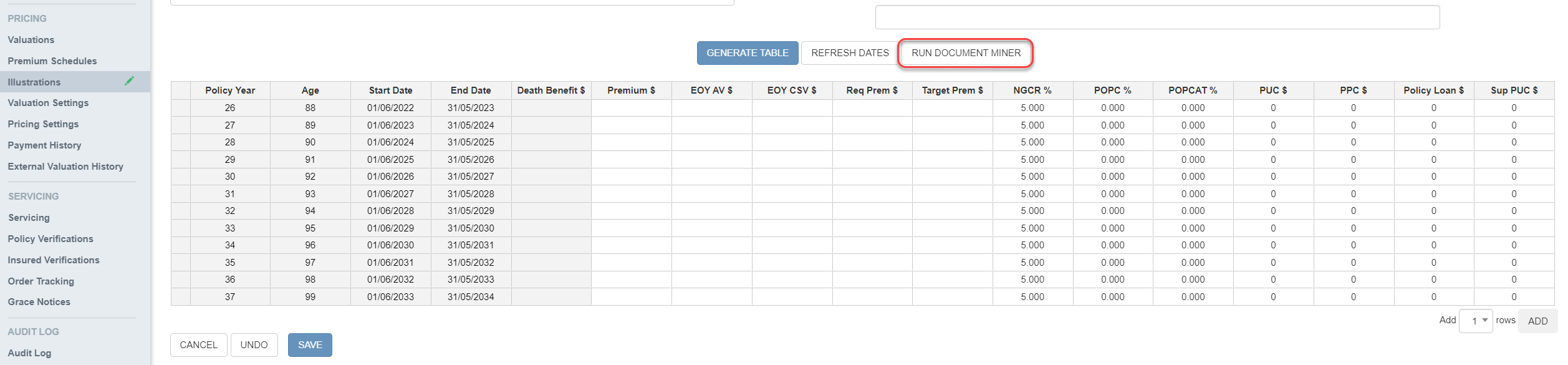
Once processing completes, Document Miner automatically generates an Excel file containing all detected tables and adds it to the case Document List.
- High-density alert: Any extracted table containing more than 25 numeric values is highlighted in red inside the Excel file for easy identification.
- Data Transfer: You can copy and paste cell ranges directly from the output Excel sheet into the ClariNet Illustration table.